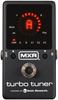
Turbo Tuner, Guitar Tuner, Chromatic Strobe Tuner, Musical Instrument Tuner


M400 Full Size Stompbox Strobe Tuner

ST-300 Strobe Tuner

Click image for larger pictures

Table of Contents


Control Panel

Quick Start

Output Config

Display Brightness

Tuning Modes

Tuning Tips

Features

Flat Tuning

Reference Pitch

The Clear Key

Editing an Open Tuning

Temperaments

Specifications


Turbo Tuner Model M400 Owner's Manual

Overview


Click Here For The Full Manual->


Control Panel


Stroboscopic Display

Direct Analog Drive for

instant response and

extreme accuracy


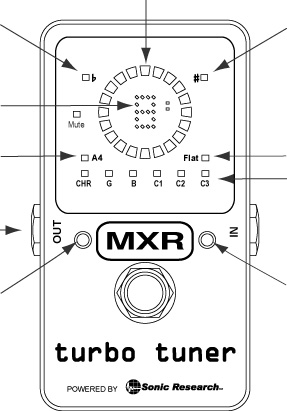
Indicates note is more than 50 cents flat

ST-300 Turbo Tuner Front Panel

Indicates note is more than 50 cents sharp


Note Display - shows note name in chromatic mode, string number in guitar mode


Drop tuning indicator - can drop up to 6 semitones.

Lights when A4 is not 440.0

A4 range is 300.0 to 599.9 Hz.


Mode indicator. Six modes total, fully programmable


True Bypass or

Buffered Output


Mode change button. Hold during power on to change the A4 reference frequency

Mode change button. Hold during power up to change number of flats


Quick Start


  1. Connect an external 9V supply or install a 9V alkaline battery.

  2. Plug in your instrument and turn on the tuner. Make sure the volume control on your guitar is all the way up.

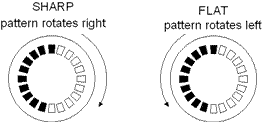
  3. Play a note and observe the pattern in the LEDs. The direction of rotation indicates whether the note is sharp or flat. The farther out of tune, the faster the pattern will rotate.

  1. Turn the tuning pegs as fast as you want. The Turbo Tuner's zero latency display will track the note instantly and keep up no matter how fast you change the pitch.

  2. Don't worry about trying to get the rotation to stop completely. As long as it's moving slowly you are within a fraction of a cent.

Back to Top

Buffer / True Bypass


Buffered Output

  s

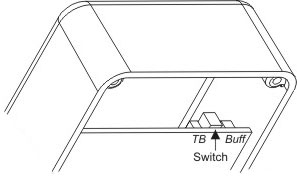
Flip the internal switch to the BUFF position.


Switch

The M400's buffer is a transparent buffer - it does not color your tone at all. The buffer has three modes:

Buffer Mode 1 - Normal Mode:

The output is muted when the tuner is on.

Buffer Mode 2 - Passthrough Mode:

The output is always live. The footswitch turns the tuner on and off.

Mode 3 - Monitor Mode:

The tuner is always on. The footswitch mutes / un-mutes the output.

Setting the Buffer Mode:


  1. With the tuner on, press and hold the footswitch.

  2. While holding the footswitch down, press the Right MODE button. The number 1, 2 or 3 will appear in the note display. Pressing the Right button will through the three modes.

  3. When the desired mode is displayed, release the footswitch.

True Bypass

  s

Flip the internal switch to the TB position. In True Bypass mode the tuner's circuitry is completely removed from your guitar's signal and the power source. This means you can leave your instrument plugged in and it will not drain the battery when the tuner is off.

Back to Top

Display Brightness


The M400 has four levels of brightness, from 1 to 4 with 4 being the brightest.

Setting the Brightness:


  1. With the tuner on, press and hold the footswitch.

  2. While holding the footswitch down, press the Left MODE button. The number 1-4 will appear in the note display. Pressing the Left button will scroll through the four brightness levels.

  3. When the desired brightness is selected, release the footswitch.

Back to Top

Chromatic/Guitar Modes

Chromatic Mode


In chromatic mode, the tuner responds to all 12 notes of the chromatic scale. The note display in the center of the LED ring will show the letter of the note.

Guitar/Bass Modes


In guitar mode, the tuner only selects notes that are defined for the particular tuning. For example, standard guitar tuning has six notes, E4, B3, G3, D3, A2 and E2. The note display in the center of the LED ring will show the string number instead of the note name.

The table below shows the settings pre-programmed into the M400. These can be modified for any tuning with up to 9 strings, and can also be set to chromatic mode, with offsets for each note for special tunings. This will be described in a later section.

Guitar


Bass


CST1
(Standard)


CST2
(Drop D)


CST3
(6 String Bass)

String #

Note

String #

Note

String #

Note

String #

Note

String #

Note

1

E4

1

G2

1

E4

1

E4

1

C3

2

B3

2

D2

2

B3

2

B3

2

G2

3

G3

3

A1

3

G3

3

G3

3

D2

4

D3

4

E1

4

D3

4

D3

4

A1

5

A2

5

B0

5

A2

5

A2

5

E1

6

E2


6

E2

6

D2

6

B0


Back to Top

Tuning Tips

The Turbo Tuner is designed to respond quickly to the notes from your guitar without resorting to adjusting the volume or plucking the string differently than you normally would when playing.

  1. Mute the strings not being tuned by resting your fingers on them. This will eliminate sympathetic vibrations and give a quicker response and a cleaner pattern in the strobe display.

  2. Turn the tuning pegs as fast as you want. The Turbo Tuner's zero latency display will track the note instantly and keep up no matter how fast you change the pitch.

  3. Don't worry about trying to get the rotation to stop completely. As long as it's moving slowly you are within a fraction of a cent.

Back to Top


M400 Features


  • True Strobe Display

Easy to read display instantly shows the slightest difference in pitch of the note played from the indicated note. The ring of LEDs is a true stroboscope, driven directly by the analog input signal and a precision internal frequency reference. This gives zero latency and instantly shows the slightest tuning error.

  • True Bypass / Muted Output

The output of the M400 is muted when the tuner is on, and when off the input signal is passed directly to the output. It is completely disconnected from all internal circuitry and the tuner puts zero load on the signal. There is no load on the battery when the tuner is off, so you can leave your instrument plugged in.

  • Extreme Accuracy

The internal timing generator is calibrated at the factory to maintain a precision of ±.02 cents.

  • Chromatic Mode

Permits tuning to any of the 12 notes from C0 to C8, in any temperament.

  • Open Tuning Modes

Tunes to preset or user defined tunings. In this mode the tuner only recognizes notes that are defined for the specified tuning. The tuner comes with a number of pre-defined tunings for stringed instruments. These can be edited by the user.

  • Power On Restore

The M400 remembers the settings for mode, drop tuning and A4 changes. No battery is necessary.

  • Flat Tuning

Lowers all pitches up to six semitones.

  • Reference Pitch Change

By default, the tuner uses A4=440Hz as the reference pitch. This can be changed in increments of .1Hz, over the range of 300.0 Hz to 599.9 Hz.

  • Temperaments

The M400 can operate in the equal temperament or any 12 note temperament the user desires. The M400 can store a total of 5 different temperaments, in addition to the equal temperament.

  • Battery or External 9 Volt Operation

The Turbo Tuner M400 can operate for 12 hours continuous from a standard alkaline battery. This is enough for about 1,000 tune ups. It also works with any 9 Volt adapter designed for stomp boxes.

  • Low Battery Indication

When there is about an hour of battery life remaining, a low battery warning is shown on the note display every 2 minutes.


Back to Top

Flat Tuning


Flat tuning lowers the pitch of all notes below the regular tuning from one to six semitones. To change the number of flats, hold the FLAT button while turing the tuner on. The Flat LED will flash, and the note display will show the number of flats. Pressing the FLAT button will advance the number of flats. Pressing the CAL key will save the number of flats and return to normal operation.

When the number of flats is anything other than zero, the Flat LED will be illuminated.

Back to Top

Changing the Reference Pitch


The default reference pitch is A4=440 Hz. This can be changed in .1Hz increments to any value from 300.0 Hz to 599.9 Hz.

To change the reference pitch, press the CAL button while turning the tuner on. The A4 LED will flash, and the current setting of A4 will scroll through the note display.You then press the CAL button to scroll through the current setting, and use the FLAT button to change each digit.

After the desired value has been entered, press the CAL button until the note display is blank, and press the FLAT button. The tuner will now resume normal operation.

Whenever the A4 reference is set to anything other than 440.0 Hz, the A4 LED will be illuminated.


The Clear Function


Holding down both buttons while turning on the power will have the following effect:

  • The A4 reference frequency is set to 440Hz.

  • Any flats are cleared.

Back to Top

Editing A Tuning


You may edit the notes of any tuning except Chromatic. A tuning may have up to 12 strings.

Please refer to the PDF manual available here ->

Back to Top

Temperaments


Any of the five modes other than Chromatic may be set as an alternate temperament. When set to a temperament, the tuner will respond to all 12 notes of the chromatic scale, and each note may be offset by up toe ±50.0 cents in .1 cent increments.

Please refer to the PDF manual available here ->

Back to Top

  Specifications

Dimensions

4.4" (11.2cm) x 2.4" (6.1cm) x 1.4" (3.4cm) HxWxD

Weight

246 g / 8.7 oz (including battery)

Output

True bypass, muted output. Zero load on signal when tuner is off. Output muted when tuner is on. Zero battery drain when off.

Buffer: 1Meg Ohm input impedance, 470 Ohm output. Three modes of operation.

Tuning Range

C0 (16.35 Hz) to C8 (4,186.0 Hz)

Accuracy

+/- .02 Cents (calibrated crystal oscillator)

Reference Pitch

A4 = 300.0 Hz to 599.9 Hz in .1 Hz increments.

Jacks

Input, Output (1/4") external 9 VDC, parallel 9 VDC

Power Supply

9 Volt Alkaline Battery or external 9 Volt DC adapter.

Power Consumption

48 mA typ. Gives 12 Hour continuous operation with alkaline battery.